Mailbox warm-up, explained: why new mailboxes start slowly
A new mailbox that suddenly sends hundreds of emails looks suspicious to Gmail and Outlook. What warm-up is, why it takes three weeks, and how Seekpitch helps.
· 5 min read
When you connect a new mailbox to Seekpitch, you will notice that it does not send many emails at first. On the first day it sends five. A week later it sends around a dozen. It only reaches its full pace after about three weeks. This gradual start is called warm-up, and it is one of the most important things you can do to make sure your emails are actually read.
Why email providers are cautious with new mailboxes
Gmail, Outlook and other providers handle billions of emails every day, and a large share of them is unwanted. To protect their users, they look closely at how each sender behaves, especially senders they have never seen before.
Think of it like a new customer at a bank. Someone who opens an account and immediately moves a very large sum will attract attention, even if everything is legitimate. Someone whose activity grows steadily over time looks normal. Email providers apply the same common sense.
A mailbox that was created yesterday and today sends two hundred emails to strangers looks exactly like a spammer. Even if every message is honest and relevant, many of them may go straight to the spam folder, and the mailbox may be limited or blocked. Once that happens, recovery is slow.
What warm-up does
Warm-up builds a sending history that looks like a real person starting a new job. The mailbox begins with a handful of emails and sends a little more each day. As people open, read and reply, providers learn that the sender is genuine, and they become more willing to deliver its messages to the inbox.
The Seekpitch warm-up schedule
Seekpitch applies the same schedule to every mailbox you connect, automatically. You do not need to change any settings or remember to increase anything.
| Period | Outreach emails per day |
|---|---|
| Week 1 (days 1 to 7) | From 5 on day one, rising by one each day to 11 |
| Week 2 (days 8 to 14) | 15 |
| Week 3 (days 15 to 21) | 22 |
| From day 22 | 30 |
Every mailbox follows this schedule, even one that has sent email elsewhere before. The reason is simple: a mailbox that sent a few personal emails a week is still new to outreach, and it is safer to treat it that way.
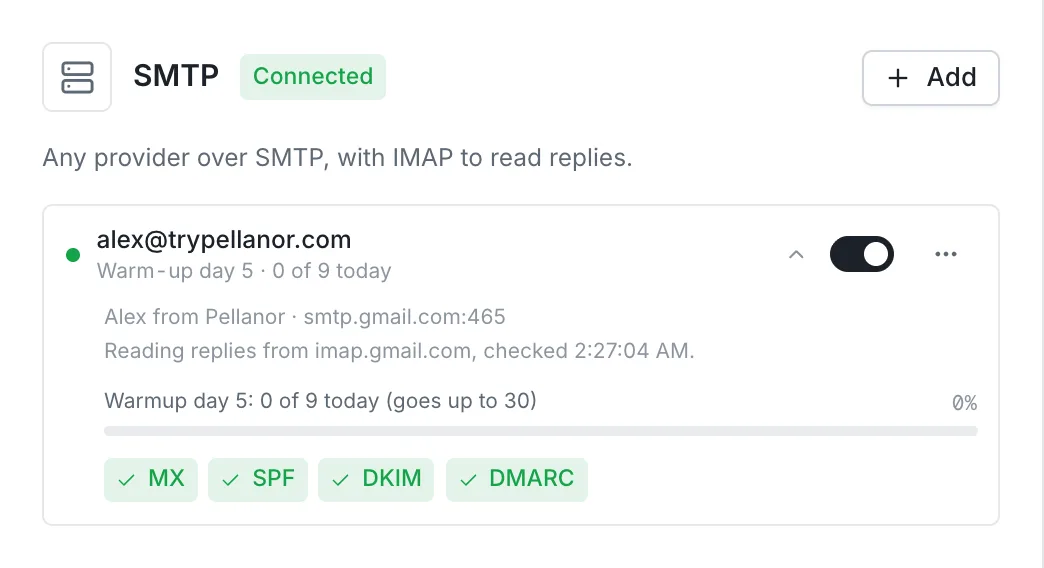
You can see where each mailbox stands on the Integrations page. Each one shows its warm-up day, how many emails it has sent today, and how many it is allowed to send.
Why 30 emails a day is the ceiling
Thirty outreach emails a day, spread across working hours, is a pace that a careful salesperson could reasonably manage by hand. It keeps your sending looking natural and leaves plenty of room below the limits that Google and Microsoft set for their mailboxes.
If you want to reach more people, the right answer is to connect more mailboxes, not to send more from one. With three warmed-up mailboxes, for example, you can send around 90 outreach emails a day. Seekpitch spreads your emails across all of your mailboxes automatically and keeps each one within its own limit.
Other ways Seekpitch protects your mailboxes
Warm-up is one part of a broader approach to careful sending:
- Business hours. Emails go out during the working day in each lead's own time zone, so they arrive when people are at their desks.
- Spacing. Emails from the same mailbox are spaced out through the day rather than sent in a burst.
- Checked addresses. Seekpitch checks email addresses before sending and labels any it could not confirm, because emails that bounce harm a sender's reputation.
- Trust records. A mailbox stays on hold until its domain has the three records providers expect. See why you should use a separate domain.
- Easy unsubscribe. Every outreach email includes a one-click unsubscribe option that mail apps display, so people who are not interested can opt out rather than report spam.
- Stopping on reply. Follow-ups stop as soon as someone answers.
What you can do during warm-up
The first three weeks are not wasted time. In fact, they are an excellent period to refine your approach while the volume is low.
- Review your leads carefully. Approve the companies that are clearly a good fit. A smaller, well-chosen list produces better replies than a large, loose one.
- Read your first emails closely. Make sure the facts about your business, stored under Company & facts, are accurate and specific. The agent can only write from what you give it.
- Answer every reply promptly. Early replies are a strong positive signal to email providers, and a quick answer makes a good impression on the person who wrote.
- Add more mailboxes early. If you know you will want more volume later, connect the extra mailboxes now so they warm up at the same time.
Frequently asked questions
Can I skip warm-up if I am in a hurry?
No, and we would not recommend it even if you could. Sending too much too soon is the fastest way to damage a mailbox. Three weeks of patience protects months of future outreach.
Do replies and my own emails count towards the limit?
The daily limit applies to outreach emails, meaning first emails and follow-ups in your campaigns. When you answer someone who has replied, you are continuing a real conversation, and Seekpitch sends that answer promptly.
What happens if I remove a mailbox and add it again?
The warm-up begins again from day one. If a mailbox needs to reconnect, for example after you change its password, it is still worth reconnecting rather than replacing it with a new address, because the mailbox itself keeps its history with email providers.
My mailbox sent fewer emails than its limit today. Why?
The limit is a maximum, not a target. A mailbox may send fewer emails if there are not enough approved leads waiting, if the leads' business hours have ended, or if follow-ups are not yet due. Approving more leads usually solves this.
In short
Warm-up is how a new mailbox earns the trust of email providers. Seekpitch handles it for you, starting at five emails a day and reaching thirty after three weeks. Use that time to sharpen your leads and your message, and connect extra mailboxes early if you plan to grow. If you have not connected a mailbox yet, our Gmail and Google Workspace guide takes about ten minutes.
Paste your website. Get leads that fit.
Try it free for 7 days with 50 qualified leads. No card needed, and nothing is sent without your approval.