From reply to booked call: answering cold email replies
A reply is where outreach starts to pay off. How to answer each kind, from interested to not now, and how Seekpitch sorts them and drafts your answer.
· 5 min read
All of the work that goes into outreach, from finding leads to writing and sending emails, exists to produce one thing: a reply. Yet replies are often handled in a hurry, days late, or not at all. A thoughtful answer, sent promptly, is frequently the difference between a conversation that fades and a meeting in the calendar.
This guide describes the most common kinds of replies, how to answer each one, and how Seekpitch helps you keep on top of them.
Speed matters more than polish
When someone replies with interest, they are thinking about your offer at that moment. A few hours later, their attention will have moved on. Aim to answer interested replies within the same working day, and ideally within an hour or two. A short, helpful answer sent quickly is better than a perfect answer sent next week.
The five kinds of reply, and how to answer each
1. Interested: “Tell me more” or “Can we talk?”
This is the reply you are hoping for. Keep your answer short, respond to exactly what they asked, and make the next step easy. If they want to talk, offer two or three specific times or a booking link. If they asked a question, answer it in a sentence or two, then suggest a short call to go further.
2. A question or an objection
Questions such as “How much does it cost?” or “We already use another tool” are signs of interest, not rejection. Answer honestly and briefly. If you do not know the answer, say that you will check and come back to them, and then do. Never guess at a price, a feature or a commitment.
3. Not now: “Maybe next quarter”
Thank them, respect the timing, and ask whether you may get in touch at the time they suggested. Make a note to do so. Many sales begin with a polite “not now” that turns into a “yes” months later.
4. Wrong person: “Speak to my colleague”
This is useful. Thank them and write to the person they mentioned, referring to the introduction: “Sarah suggested I get in touch with you about…” A referral from inside the company makes your next email far more likely to be read.
5. Not interested or unsubscribe
Respect it immediately and completely. Do not argue or try one more time. If you reply at all, a single courteous sentence is enough. Make sure they receive no further emails from any campaign. Handling this well protects your reputation and your ability to reach everyone else.
You will also receive out-of-office messages. These are automatic and need no answer, but they often say when the person will return, which can be a good moment to write again.
Principles for every reply
- Answer the question they asked. Do not use a reply as an opportunity to repeat your whole pitch.
- Keep it short. Two to four sentences is usually enough.
- Be accurate. Only promise what you can deliver, and only state facts you can stand behind.
- Make the next step clear. Suggest a time, offer a link, or ask one simple question.
- Write like a person. Plain, polite language works better than sales language.
How Seekpitch helps with replies
When you send outreach from several mailboxes, replies can be scattered across different inboxes and easy to miss. Seekpitch brings them together in one place.
One inbox for every mailbox
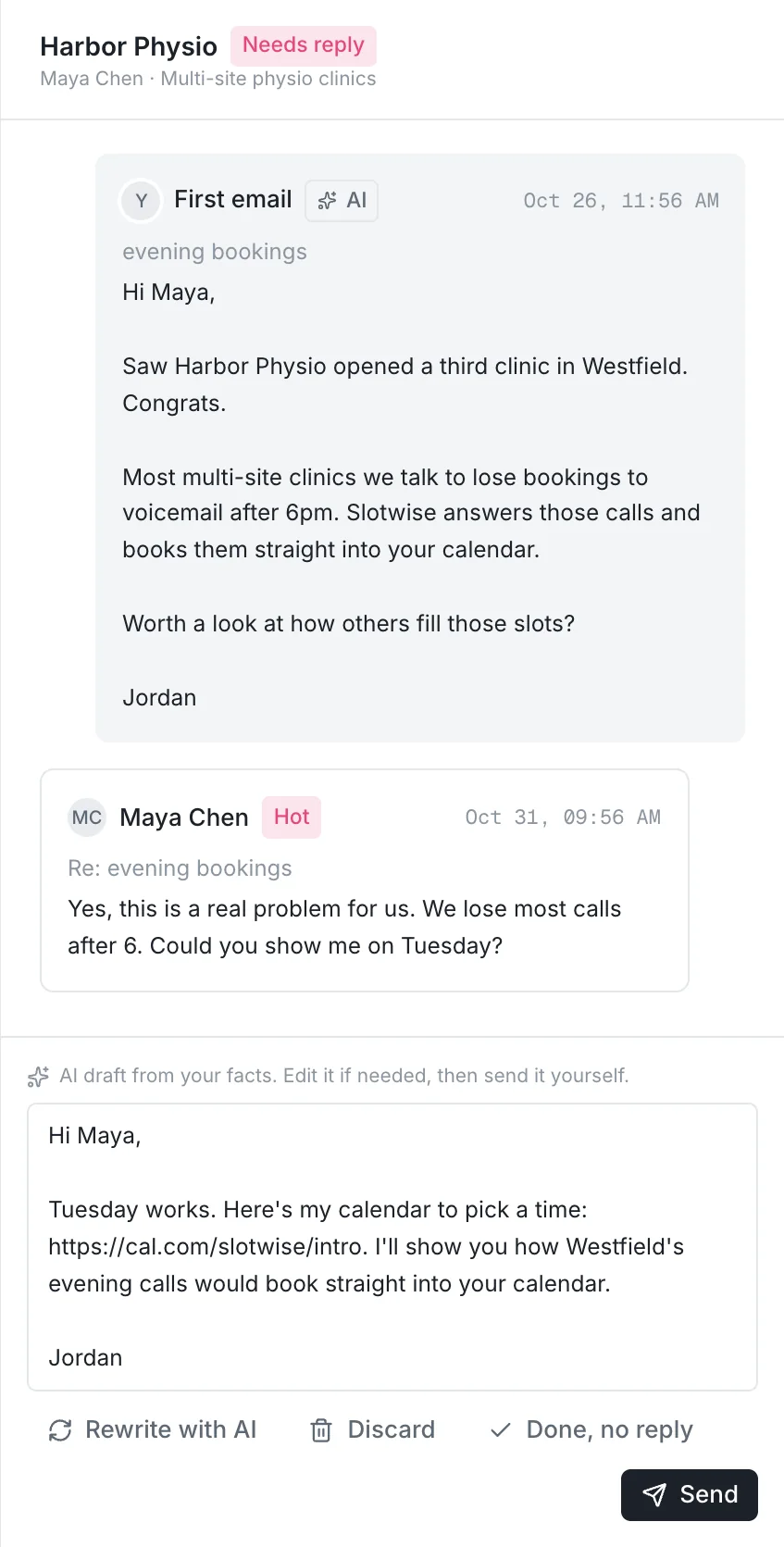
Every reply from every connected mailbox appears in the Seekpitch Inbox, matched to the lead and the campaign it came from. You can see the whole conversation, including the original email and any follow-ups, in one view.
Sorted by intent
Each reply is labelled, for example Hot for people who want to talk, Out of office for automatic replies, and Unsubscribed for people who have asked not to be contacted. You can start each day with the replies that matter most.
A draft ready for you to check
For interested replies, Seekpitch prepares a draft answer. The draft only uses the facts you have provided about your business. If the lead asks something you have not covered, the draft says you will check rather than inventing an answer. You read the draft, adjust it as you wish, and send it yourself. Seekpitch never sends a reply on your behalf without you.
Follow-ups stop automatically
As soon as a lead replies, Seekpitch stops any follow-ups still scheduled for them. You will never send an automatic reminder to someone who has already answered.
An alert when it matters
When someone wants to talk, Seekpitch sends you an email straight away, so an interested reply never waits unnoticed until you next sign in.
To make all of this work, Seekpitch needs permission to read replies in your mailbox. If you use Google, our Gmail and Google Workspace guide shows exactly what to enter.
A simple daily routine
- Open the Seekpitch Inbox once in the morning and once in the afternoon.
- Answer every Hot reply first, using the draft as a starting point.
- Answer questions and objections next, honestly and briefly.
- Note any “not now” replies with the date to follow up.
- Leave out-of-office and unsubscribe replies, which need no action.
For most people this takes less than half an hour a day, and it is the most valuable half hour in the whole outreach process.
In summary
Replies are where outreach turns into revenue. Answer quickly, answer the actual question, stay accurate, and always make the next step easy. Seekpitch collects your replies in one inbox, sorts them by intent and prepares a draft, so your time goes into the conversations rather than the admin. See what every plan includes.
Paste your website. Get leads that fit.
Try it free for 7 days with 50 qualified leads. No card needed, and nothing is sent without your approval.